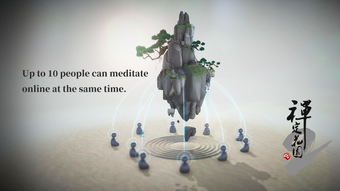

Zen Garden 2: Calm Your Mind with Nature
Is Zen Garden 2 available for free?
Yes, Zen Garden 2 is completely free to download and use on iOS devices.
What iOS version is required to run Zen Garden 2?
Zen Garden 2 requires iOS 16.4 or later to operate properly.
Can I use Zen Garden 2 offline?
Yes, the app functions without an internet connection once installed.
Does Zen Garden 2 support multiple languages?
Yes, Zen Garden 2 is available in both English and Chinese.
How often are updates released for Zen Garden 2?
Updates are released by the developer as needed to improve functionality and compatibility.
Overview
Zen Garden 2 is a mobile application designed for users seeking mindful relaxation and stress reduction through digital nature experiences. Developed by Shenzhen Macrotellect Limited, the app falls under the Health & Fitness category and is tailored for iPhone users who wish to integrate mindfulness practices into their daily routines. Its primary purpose is to provide a serene, interactive environment that simulates a tranquil garden, promoting mental clarity and emotional balance. The app addresses common challenges such as digital fatigue, anxiety, and the need for short, accessible mental resets throughout the day.
Target users include individuals interested in meditation, mindfulness, and self-care, especially those who prefer visual and tactile engagement over audio-based practices. Real-world usage scenarios include using the app during morning routines, midday breaks, or before bedtime to create a calming pause in a busy schedule. While specific details about developer history are not available beyond the company name, the app’s release on Softonic in February 2024 indicates a recent market entry with community-driven visibility. The app’s focus on simplicity and sensory engagement positions it as a tool for emotional wellness in a fast-paced digital world.
Key Features & Capabilities
- Interactive Garden Environment – Users can engage with a digital garden that responds to touch, allowing for intuitive manipulation of plants, water features, and natural elements.
- Mindfulness-Focused Design – The interface emphasizes minimalism, soft animations, and ambient visuals to support a meditative state without distractions.
- Multi-Language Support – Available in both English and Chinese, making it accessible to a broader audience across different regions.
- Lightweight Visual Experience – Designed to deliver a calming visual journey without requiring high processing power or extensive device resources.
These features are intended to help users achieve moments of mental stillness, particularly during high-stress periods. The interactive garden allows users to plant, water, and rearrange elements, creating a sense of control and presence. This tactile engagement can support mindfulness by grounding attention in the present moment. The app’s design avoids intrusive notifications or complex navigation, reinforcing its role as a digital sanctuary. For users who find traditional meditation challenging, Zen Garden 2 offers a gentle, visual alternative to cultivate awareness and reduce mental clutter.
User Interface, Workflow & Performance
The user interface of Zen Garden 2 is built around simplicity and visual harmony. Navigation is intuitive, relying on touch gestures to interact with the garden environment. Users can tap, swipe, and drag to manipulate plants, water flow, and other natural components, creating a tactile feedback loop that enhances immersion. The workflow is linear and focused: open the app, engage with the garden, and step away with a calmer mindset. There are no complex menus or settings, which supports quick access and consistent use.
Performance details were not specified by the developer. However, based on the app’s 128 MB size and its focus on visual tranquility rather than intensive computation, it is likely optimized for smooth operation on supported iOS devices. The developer did not provide information about CPU or RAM usage, nor about stability under prolonged use. General expectations for such applications suggest low resource consumption and stable performance, but exact observations are not available. The app appears to prioritize visual consistency and responsiveness over advanced functionality, aligning with its wellness-oriented purpose.
Compatibility & System Requirements
Zen Garden 2 is designed exclusively for iOS devices and requires iOS 16.4 or a later version to run. This ensures compatibility with recent iPhone models that support the latest system features and display technologies. The app has a file size of 128 MB, which is relatively modest for a visual application with interactive elements. This size suggests a streamlined design that avoids excessive media bloat.
Exact system requirements were not listed. While no specific hardware details were provided, the app’s compatibility with iOS 16.4 implies it is optimized for devices released in the past few years. The developer did not specify whether it supports older iPhone models or iPad devices. Platform compatibility information is limited to the iOS requirement and version. Users should verify that their device meets the minimum OS threshold before downloading.
Pros and Cons
Pros
- Free to download and use, making it accessible to a wide audience.
- Simple, intuitive interface ideal for users seeking quick mental resets.
- Supports both English and Chinese, enhancing global accessibility.
- Lightweight design with minimal system resource demands.
- Offers a visual, interactive approach to mindfulness and relaxation.
Cons
- Only available on iOS, limiting access for Android and other platforms.
- No information on advanced features or customization options.
- Compatibility with older iPhone models is unclear.
- Limited to visual interaction; no audio or guided meditation components.
- Performance data and stability under extended use were not provided.
Final Thoughts + CTA
Zen Garden 2 presents a thoughtful, minimalist approach to digital mindfulness. Its focus on visual serenity and tactile interaction makes it a compelling option for users looking to reduce mental clutter and find brief moments of peace. The app’s free status, combined with its lightweight design and multilingual support, strengthens its appeal.
While it lacks advanced features and detailed technical information, its core purpose is fulfilled with elegance and restraint. For iPhone users interested in relaxation tools that don’t require a learning curve, Zen Garden 2 delivers a calm, consistent experience. It is particularly suited for those who value simplicity and visual engagement in their wellness journey.
Download Zen Garden 2 now







